
Last updated on
Oct 19, 2026
DD 2910 2020-2026 free printable template
pdfFiller is not affiliated with any government organization

Fill out
Complete the form online in a simple drag-and-drop editor.

eSign
Add your legally binding signature or send the form for signing.

Share
Share the form via a link, letting anyone fill it out from any device.

Export
Download, print, email, or move the form to your cloud storage.
Why pdfFiller is the best tool for your documents and forms


End-to-end document management
From editing and signing to collaboration and tracking, pdfFiller has everything you need to get your documents done quickly and efficiently.
Accessible from anywhere
pdfFiller is fully cloud-based. This means you can edit, sign, and share documents from anywhere using your computer, smartphone, or tablet.
Secure and compliant
pdfFiller lets you securely manage documents following global laws like ESIGN, CCPA, and GDPR. It's also HIPAA and SOC 2 compliant.
What is DD 2910
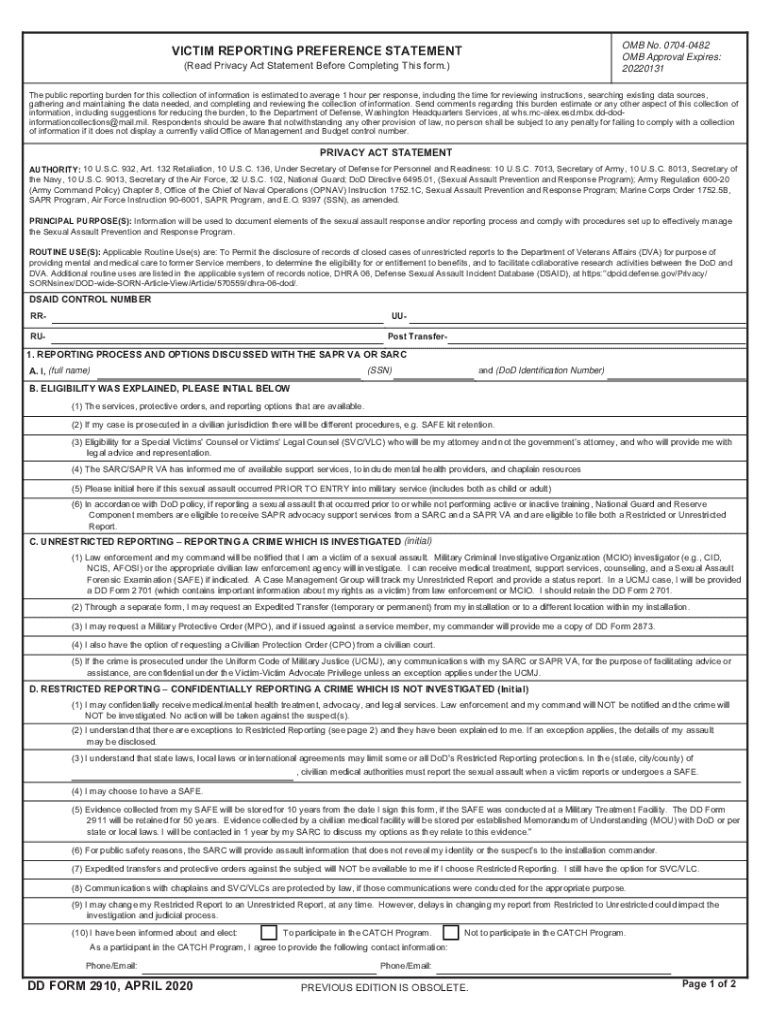
The DD Form 2910 Victim Reporting Preference Statement is a government form used by victims of sexual assault in the military to document their reporting preferences.
pdfFiller scores top ratings on review platforms




Who needs DD 2910?
Explore how professionals across industries use pdfFiller.

DD 2910 is needed by:
-
Military personnel who experience sexual assault
-
Sexual Assault Response Coordinators (SARCs)
-
Sexual Assault Prevention and Response Victim Advocates (SAPR VAs)
-
Counselors and support staff assisting assault victims
-
Legal representatives for military sexual assault cases
-
Administrative personnel within military organizations
Comprehensive Guide to DD 2910
What is the DD Form 2910 Victim Reporting Preference Statement?
The DD Form 2910 is a vital document utilized by victims of sexual assault within the military framework. Its primary purpose is to facilitate the documentation of reporting preferences for victims, ensuring they understand their rights in relation to reporting their experiences.
This form delineates the options available, specifically the difference between unrestricted and restricted reporting. Unrestricted reporting allows for full investigation by law enforcement, while restricted reporting provides confidentiality and support without initiating a formal investigation.
Purpose and Benefits of the DD Form 2910 Victim Reporting Preference Statement
Completing the DD Form 2910 empowers victims by enabling them to choose their preferred path for reporting sexual assaults. This form serves not only as a means of documentation but also as a cornerstone for informing victims of the protections and implications tied to each reporting option.
The benefits of this statement include providing clear choices for victims, promoting their autonomy, and outlining the associated consequences, which can vary significantly between unrestricted and restricted reporting methods.
Key Features of the DD Form 2910 Victim Reporting Preference Statement
The DD Form 2910 consists of essential fields that must be filled out appropriately, including:
-
Full name
-
Social Security Number (SSN)
-
Department of Defense Identification Number (DoD ID)
-
Signatures from the victim and the Sexual Assault Response Coordinator (SARC) or Sexual Assault Prevention and Response Victim Advocate (SAPR VA)
The section requiring the SARC or SAPR VA's signature is crucial, as it validates the form and ensures that victims receive proper guidance and support throughout the reporting process.
Who Needs the DD Form 2910 Victim Reporting Preference Statement?
The primary users of the DD Form 2910 include victims of military sexual assault, Sexual Assault Response Coordinators (SARCs), and Sexual Assault Prevention and Response Victim Advocates (SAPR VAs). These individuals are instrumental in the reporting process and require the form to facilitate the victim's reporting preferences.
This form must be utilized in scenarios involving sexual assault reporting, ensuring that victims can express their preferences regarding the course of action and assistance available to them.
How to Fill Out the DD Form 2910 Victim Reporting Preference Statement Online (Step-by-Step)
Filling out the DD Form 2910 online can be simplified into a clear process:
-
Access the form through a secure online platform.
-
Enter your full name, SSN, and DoD ID in the designated fields.
-
Select your preferred reporting option—unrestricted or restricted.
-
Ensure that your signature is provided in the correct section.
-
Have the SARC or SAPR VA complete their section, including their signature.
Utilizing tools like pdfFiller can enhance this process by providing visual aids and tips for efficient digital completion.
Common Errors and How to Avoid Them
While completing the DD Form 2910, individuals may encounter common pitfalls. Frequent errors include:
-
Omitting required signatures.
-
Providing incorrect information in required fields.
-
Failing to select a reporting option.
To validate the completed form, review each section for accuracy and completeness before submission. This step is critical to avoid delays in processing.
Submission Methods and Delivery for the DD Form 2910 Victim Reporting Preference Statement
Once the DD Form 2910 is completed, it can be submitted through various methods, including:
-
Mail to the designated office within the military structure.
-
In-person submission at a military installation or designated processing location.
It's important to adhere to submission timelines to ensure a prompt response and processing of the form.
Security and Compliance for the DD Form 2910 Victim Reporting Preference Statement
Ensuring privacy and security is paramount when handling the DD Form 2910. When using platforms like pdfFiller, users can benefit from stringent security measures, including 256-bit encryption and compliance with relevant regulations such as HIPAA and GDPR.
This commitment to security helps protect sensitive information during the submission process, reassuring victims about the confidentiality of their reporting preferences.
Sample or Example of a Completed DD Form 2910 Victim Reporting Preference Statement
Providing illustrative examples of a filled-out DD Form 2910 can be beneficial for users seeking guidance. An example should clearly show what each completed field represents, such as:
-
Full name paired with corresponding identification numbers.
-
Signature sections with examples of valid completions.
This visual reference can help reinforce users' understanding of the form's requirements.
Utilizing pdfFiller for Your DD Form 2910 Submission
pdfFiller offers a seamless experience for filling out the DD Form 2910. Users can take advantage of its intuitive features that make editing, eSigning, and submitting forms straightforward and efficient.
By leveraging these secure online solutions, users can ensure a smooth experience in managing their documentation needs while maintaining the confidentiality of their sensitive information.
How to fill out the DD 2910
-
1.Access the DD Form 2910 on pdfFiller by searching for the form name in the platform's search bar.
-
2.Open the form by clicking on it to load the document in the pdfFiller editor.
-
3.Ensure you have all necessary information at hand, including your full name, Social Security Number (SSN), and DoD Identification Number.
-
4.Use the mouse or trackpad to click on each fillable field for entry. When you click a field, a cursor will appear, allowing you to type your information directly.
-
5.If options are provided via checkboxes, simply click on the checkboxes to mark your preferences regarding unrestricted or restricted reporting.
-
6.Review all filled fields to ensure accuracy. Check for any typos or missing information to avoid processing delays.
-
7.Once all fields are complete, carefully read through the entire form to ensure it represents your reporting preferences correctly.
-
8.When satisfied with your entries, locate the 'Save' option in the pdfFiller toolbar to securely save your completed form.
-
9.To download a copy for your records, select the download icon and choose your preferred file format, such as PDF.
-
10.Finally, submit the form according to your specific procedural needs, either printing and mailing it or electronically submitting it through designated channels.

Who is eligible to use the DD Form 2910?
The DD Form 2910 is intended for military personnel who have experienced sexual assault. It allows them to specify their reporting preferences and seek the appropriate support.
What are the reporting options available on this form?
Victims can choose between unrestricted and restricted reporting options. Unrestricted reporting allows for a full investigation, while restricted reporting ensures confidentiality and support without an investigation.
Do I need to provide supporting documents with this form?
Typically, additional supporting documents are not required for the DD Form 2910 itself. However, if any specific documentation is requested thereafter, ensure you prepare them for submission.
How do I submit the completed DD Form 2910?
The completed DD Form 2910 can be submitted based on your reporting choice. For unrestricted reporting, you will provide the form to designated authorities. For restricted reporting, discuss the submission method with your SARC or SAPR VA.
What should I do if I encounter issues while completing the form?
If you face challenges while filling out the DD Form 2910, consider reaching out to your SARC or SAPR VA for assistance. They can guide you through the process and offer support.
How long does it take to process the DD Form 2910?
Processing times for the DD Form 2910 can vary. Generally, it is advisable to follow up with your designated SARC or SAPR VA for specific timelines after submitting your form.
Are there any common mistakes to avoid when filling out this form?
Common mistakes include forgetting to sign the form or leaving checkboxes unmarked. Double-check all fields and ensure both you and your SARC or SAPR VA have signed where required.
DD 2910 Form Versions
Related Content
Related Forms



Get the latest insights from our blog



If you believe that this page should be taken down, please follow our DMCA take down process
here
.
This form may include fields for payment information. Data entered in these fields is not covered by PCI DSS compliance.